Good decisions require good information. But research is slow. You open a dozen tabs, skim articles, try to separate hype from reality. By the time you've synthesized everything, the information is already stale.
Your Klaws agent does the hard part for you.
How AI research works
You ask a question. Your agent:
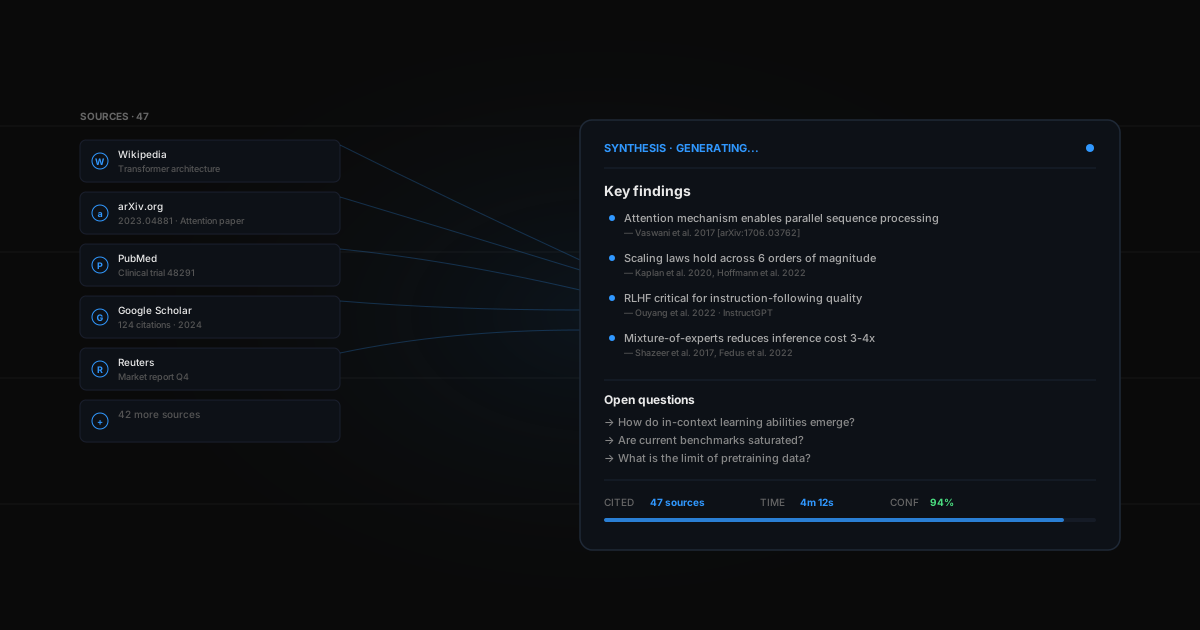
- Searches multiple sources simultaneously — web, news, forums, academic papers
- Reads and summarizes everything it finds
- Cross-references claims across sources for accuracy
- Flags contradictions — what's consensus vs. what's contested
- Delivers a structured report with inline citations
Unlike ChatGPT or Perplexity, your agent doesn't just answer a question. It investigates it. (Not sure about the difference? See AI agent vs. ChatGPT.)
A real example
You're evaluating whether to enter a new market. You ask your agent:
"Research the competitive landscape for AI writing tools. Who are the major players, what are they charging, and where are the gaps?"
Ten minutes later, you have a 2,400-word report with:
- Executive summary
- 23 citations from tech blogs, industry reports, Reddit, and Hacker News
- Market map with major players, pricing, and features
- 3 specific opportunities your agent identified
- Sentiment analysis from social media
Recurring research
The real power is scheduled research. Set it to run weekly:
"Every Friday, update me on the AI agent market — new entrants, funding announcements, feature launches, and sentiment shifts."
Now you have a living research brief that updates itself. No manual work. You can also feed research directly into a competitor monitoring workflow.
Tips for better research
- Be specific — "Research competitor pricing for project management tools" beats "Research competitors"
- Set scope — "Focus on companies with less than 50 employees" helps the agent prioritize
- Ask for structure — "Give me a table comparing features and pricing" gets you organized output
- Schedule it — recurring research catches changes that one-off reports miss
Research vs. ChatGPT
| ChatGPT | AI Research Agent | |
|---|---|---|
| Sources | Training data (stale) | Live web search |
| Citations | Often hallucinated | Real URLs you can verify |
| Depth | Surface-level | Multi-source cross-reference |
| Updates | Ask again manually | Scheduled recurring reports |
| Format | Chat response | Structured report |
ChatGPT knows things. Your agent finds things — current, cited, cross-referenced.